Container 모니터링
이제 모든 관련 문서를 확인했습니다. 상세한 답변을 드리겠습니다.
exemONE Container 모니터링 상세 가이드
exemONE에서는 Container 모니터링을 두 가지 메뉴에서 제공합니다:
- Infrastructure > Container: Docker 등 독립 실행 컨테이너 모니터링
- Kubernetes > Container: Kubernetes 환경의 컨테이너 모니터링
1. Infrastructure Container 모니터링
참고 문서: Infrastructure Container
전체 컨테이너 관점의 기본 모니터링 화면입니다.
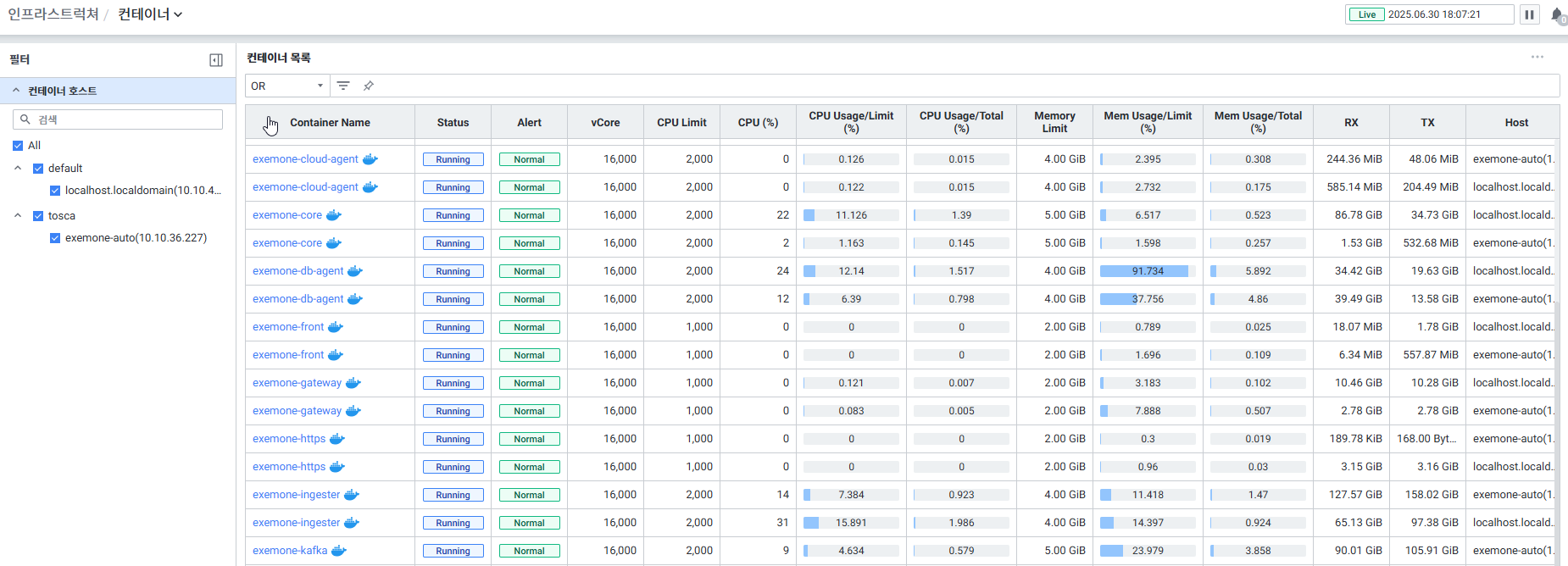
1.1 화면 구성
| 구성 요소 | 설명 |
|---|---|
| Global Time | 모니터링 재생 여부를 선택 (실시간 데이터만 조회 가능) |
| Filters | Container 화면의 필터 항목 선택 |
| Container List | Container 목록을 Grid 형태로 표시 |
1.2 Filters (필터)
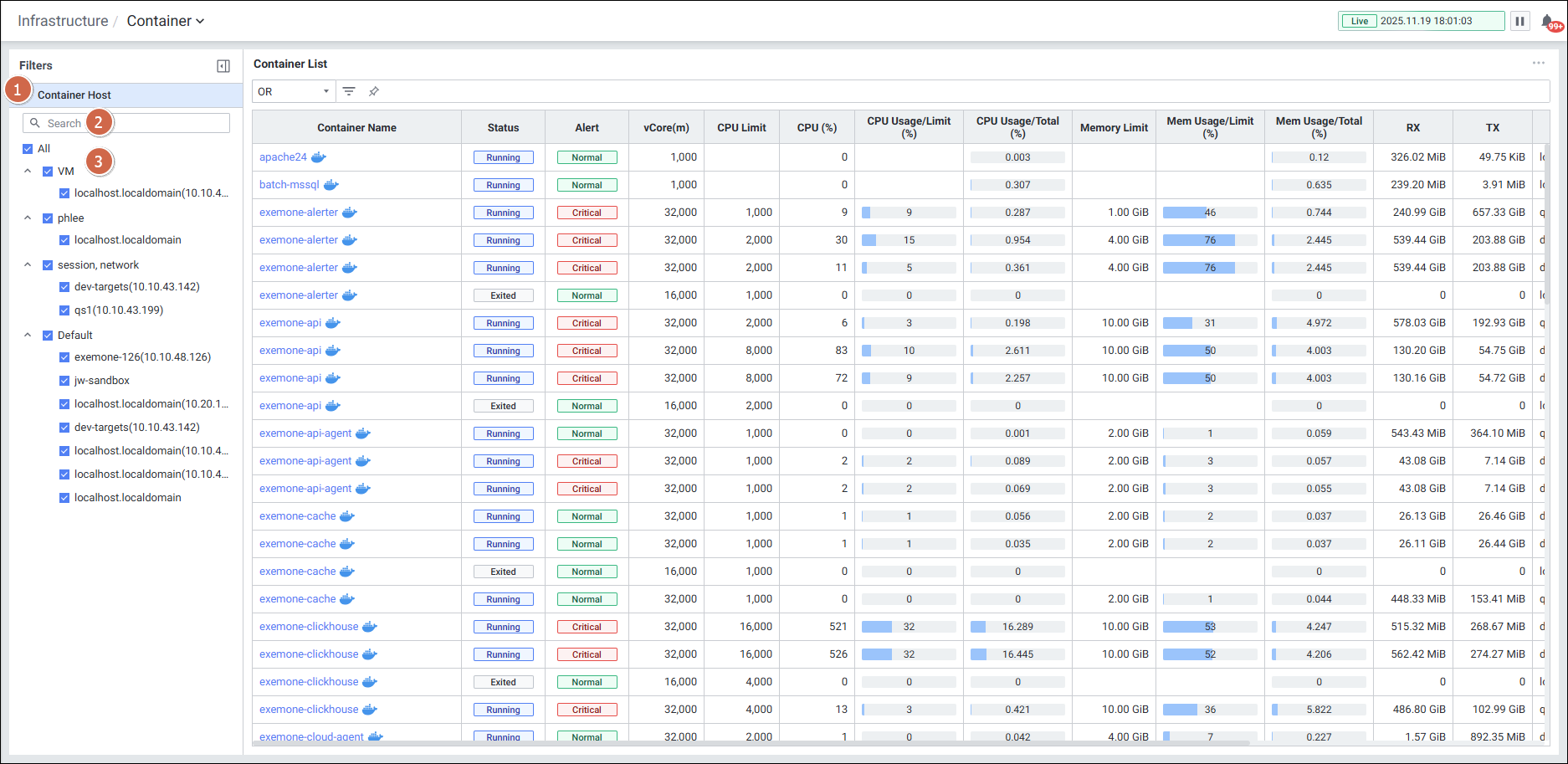
| 항목 | 설명 |
|---|---|
| Container Host | 컨테이너 호스트 하위의 필터 항목을 표시 (접기/펼치기 가능) |
| Search | 필터 항목 검색 기능 (대소문자 구분 없음) |
| Filter Item | 항목을 전체 선택한 상태로 표시, OR 조건으로 선택 가능 |
1.3 Container List (컨테이너 목록)
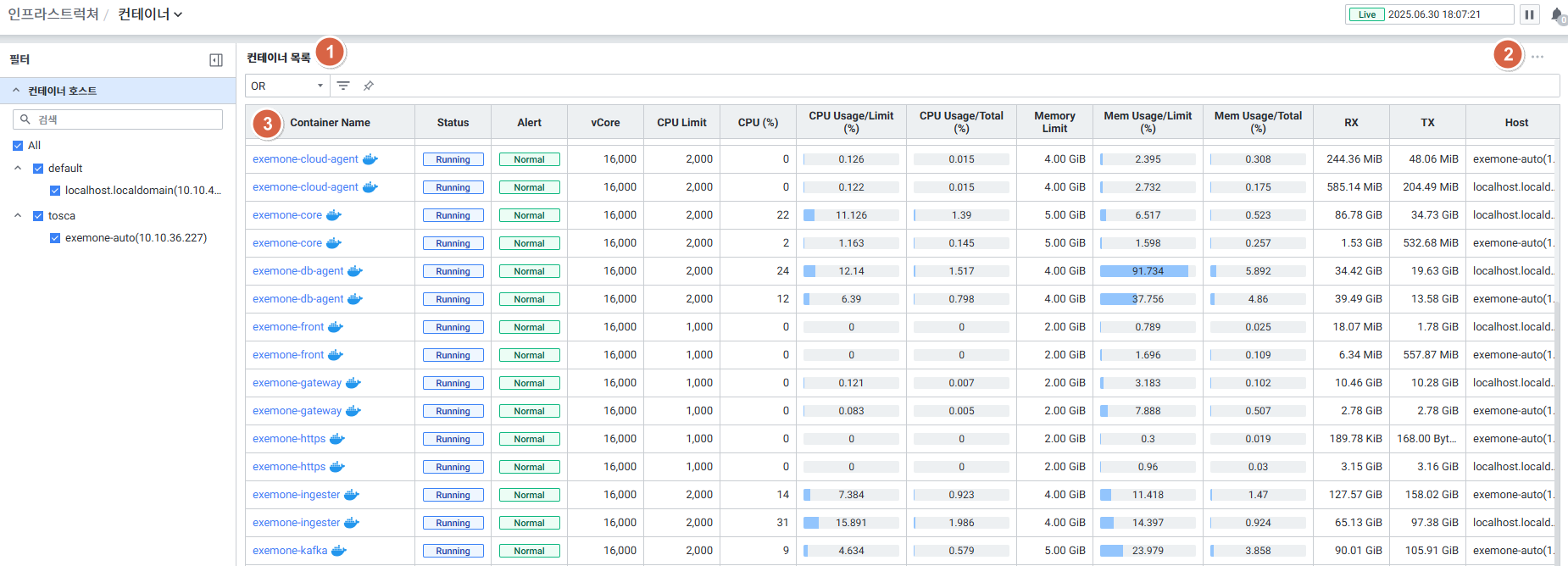
기능
| 항목 | 설명 |
|---|---|
| Option | Grid 옵션 (컬럼 설정 등) |
| Search | Container Name으로 검색 (대소문자 구분 없음) |
Grid 수집 항목
| 항목 | 설명 |
|---|---|
| Container Name | 컨테이너 이름 (클릭 시 Container Detail Slide 오픈) |
| Alert | 발생한 알람 레벨 |
| Status | Container의 현재 Status |
| vCore | vCore 개수 |
| CPU Limit | Container의 CPU Limit |
| CPU(%) | CPU 사용률 |
| CPU Usage (%)/Limit | CPU Limit 대비 사용량 |
| CPU Usage (%)/Total | CPU 실제 전체 사용량 대비 사용량 |
| Memory Limit | Container의 Memory Limit |
| Memory Usage (%)/Limit | Memory Limit 대비 사용량 |
| Memory Usage (%)/Total | Memory 실제 전체 사용량 대비 사용량 |
| RX | Container의 네트워크 수신(RX) |
| TX | Container의 네트워크 송신(TX) |
| Host | Host 이름 |
| Image | Container의 Image |
| Age | Container의 Age(가동 시간) |
1.4 Container Detail Slide (상세 슬라이드)
Container List에서 컨테이너 이름을 클릭하면 열리는 상세 화면입니다. 5개 탭으로 구성됩니다.
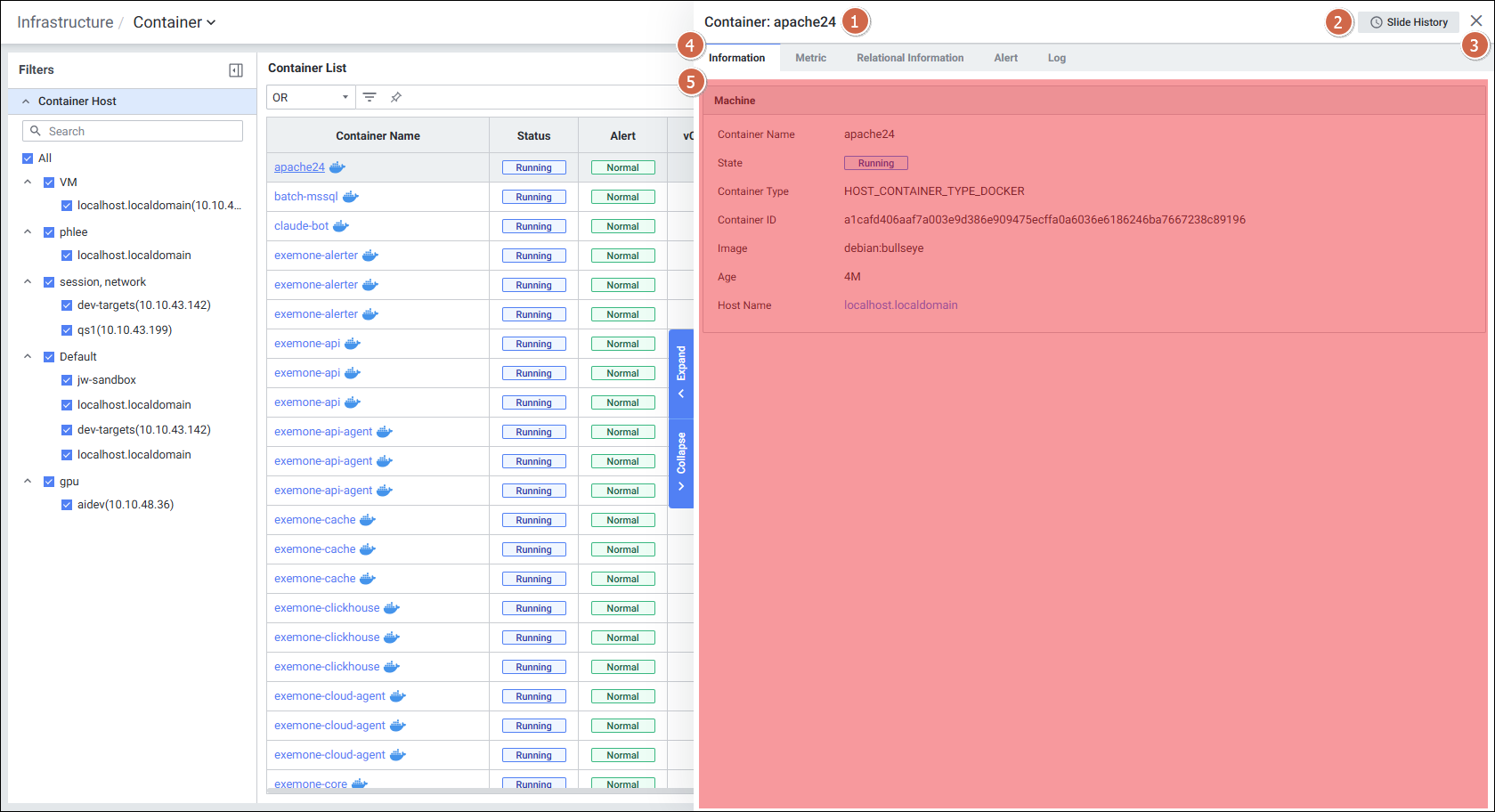
| 탭 | 설명 |
|---|---|
| Information | 컨테이너 기본 정보 |
| Metric | 성능 지표 차트 |
| Relational Information | 연관 타겟 정보 |
| Alert | 알람 정보 |
| Log | 컨테이너 로그 |
1.4.1 Information 탭
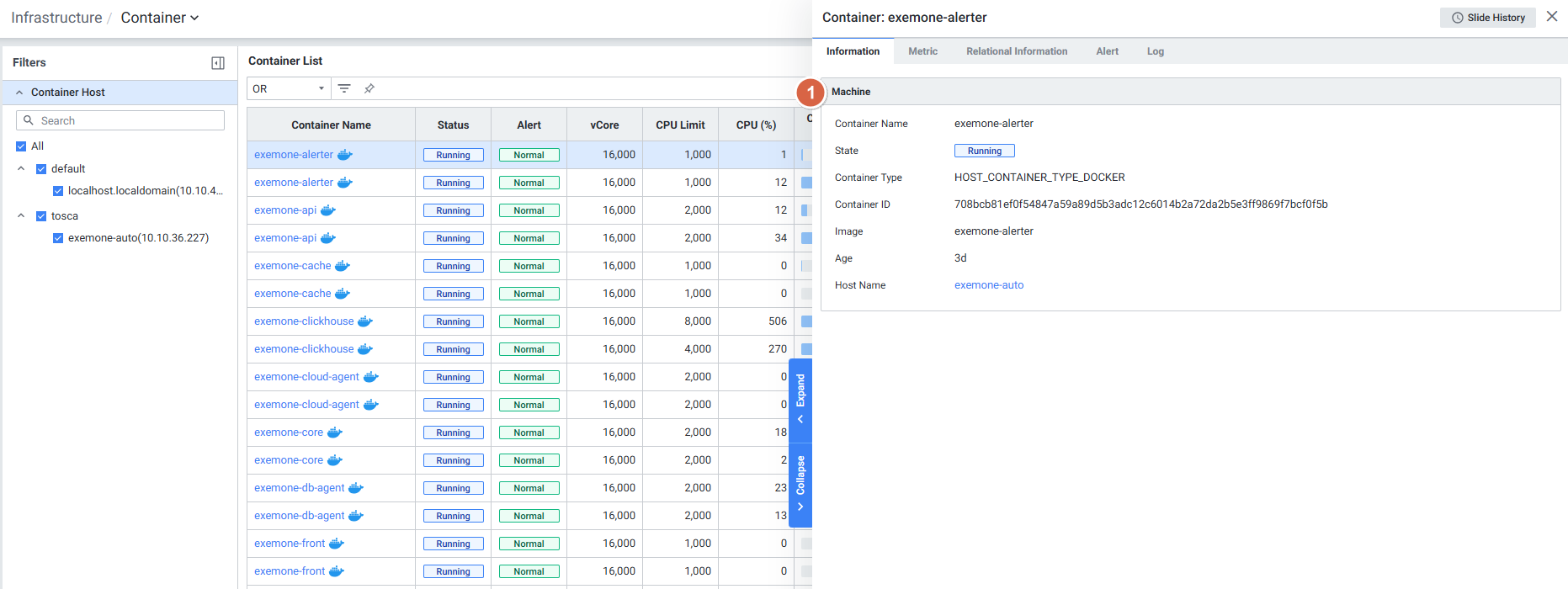
| 항목 | 설명 |
|---|---|
| Container Name | 컨테이너 이름 |
| Stat | Container 상태 |
| Container Type | Container 타입 |
| Container ID | Container ID |
| Image | Container 이미지 |
| Age | Container 구동 시간 |
| Host Name | Container가 구동 중인 Host 서버 |
1.4.2 Metric 탭
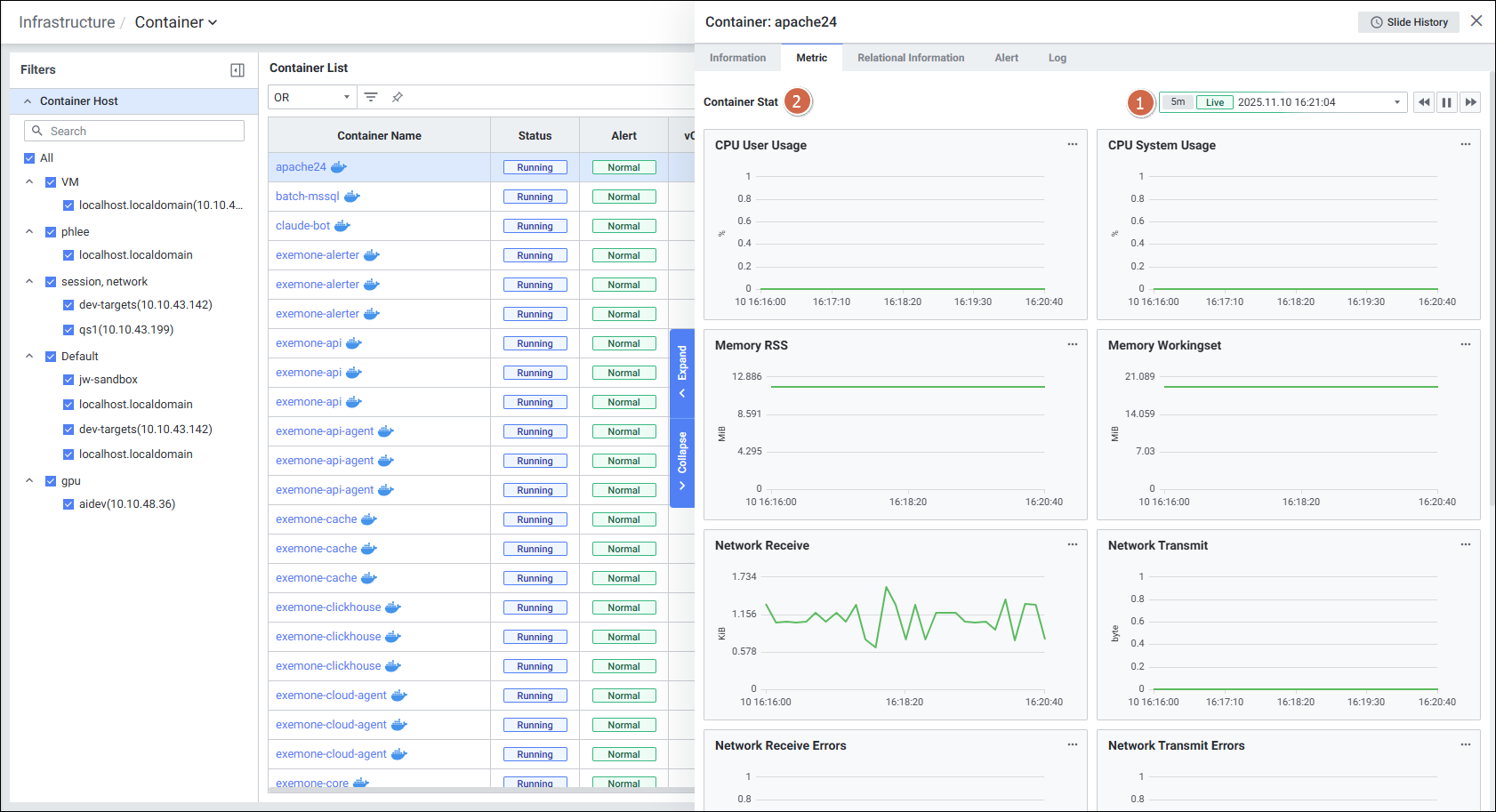
Default 최근 5분 데이터를 표시하며, 다음 12개 성능 지표를 차트로 제공합니다:
| 지표 | 설명 |
|---|---|
| CPU User Usage (%) | 컨테이너의 CPU User 사용량 |
| CPU System Usage (%) | 컨테이너 CPU System 사용량 |
| Memory RSS (bytes) | 컨테이너의 RSS memory |
| Memory Workingset (bytes) | 컨테이너의 workingset (usage – inactivefile) |
| Network Receive (bytes) | 네트워크 Receive bytes |
| Network Transmit (bytes) | 네트워크 Transmit bytes |
| Network Receive Errors (count) | 디바이스 드라이버에서 감지한 Receive 에러 패킷 수 |
| Network Transmit Errors (count) | 디바이스 드라이버에서 감지한 Send 에러 패킷 수 |
| Filesystem Read (bytes) | Disk에서 읽기 한 bytes |
| Filesystem Write (bytes) | Disk에서 쓰기 한 bytes |
| CPU Throttling Count (count) | Throttling 되는 횟수 |
| CPU Throttling (ms) | Throttling 상태에 머무르는 시간 |
1.4.3 Log 탭
참고 문서: Infrastructure Container Log
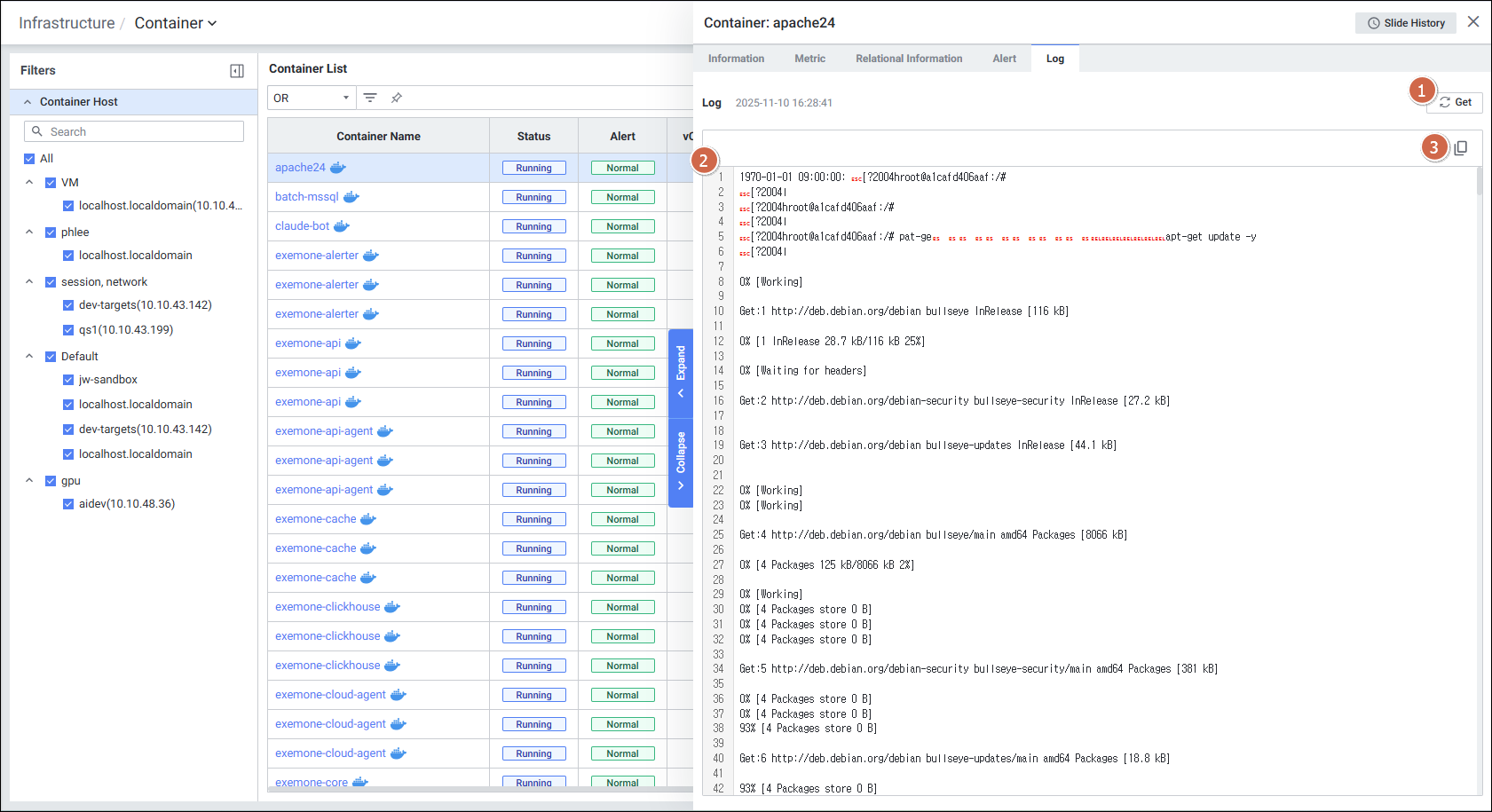
| 기능 | 설명 |
|---|---|
| Get | 클릭 시 Container Log 데이터를 가져옴 |
| Log | 컨테이너에서 발생하고 있는 로그 정보 제공 |
| Copy | 클릭 시 텍스트 복사 |
1.4.4 Relational Information 탭
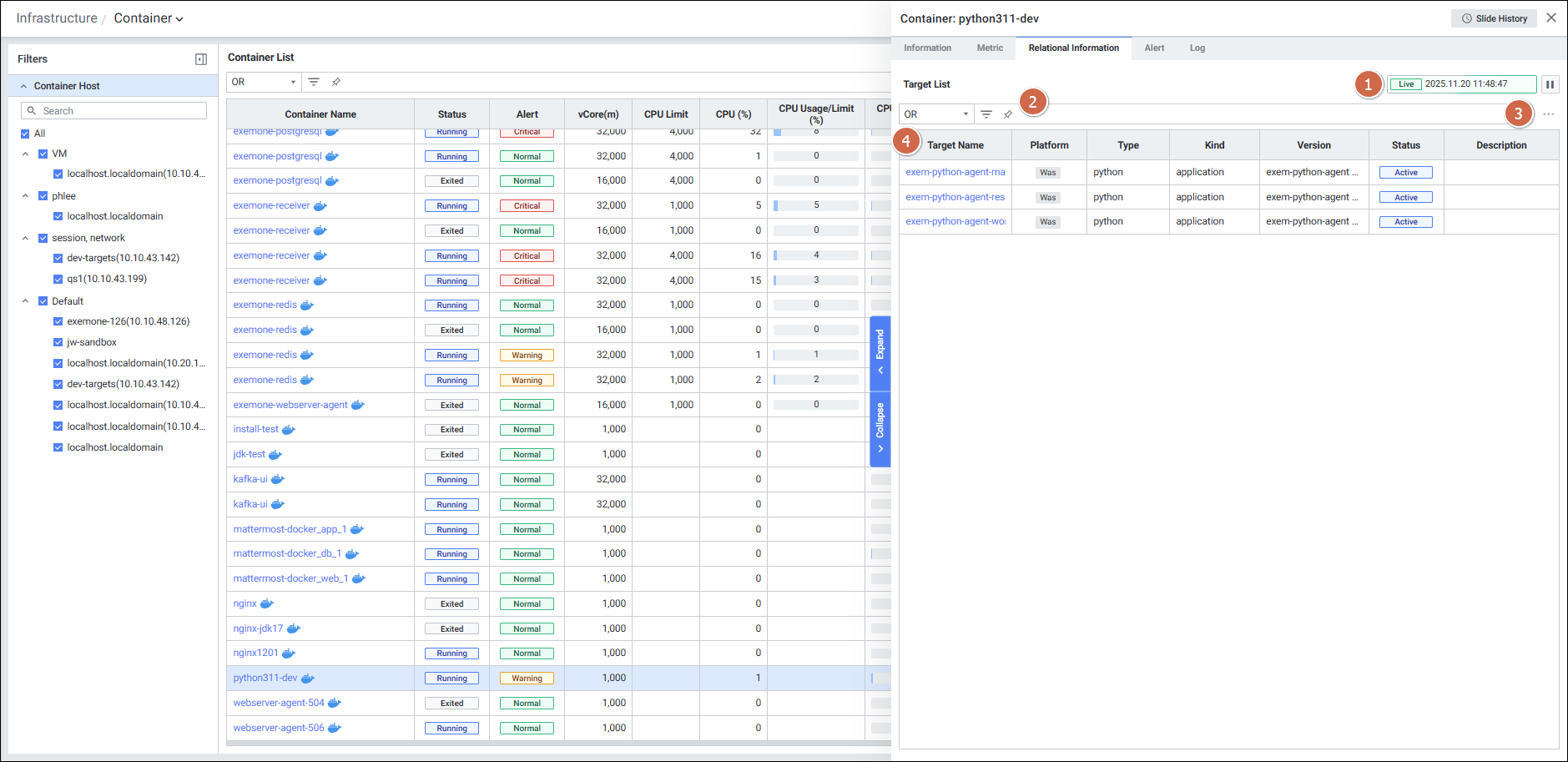
연관된 타겟 목록을 Grid 형태로 제공합니다:
| 항목 | 설명 |
|---|---|
| Target Name | 타겟 이름 |
| Platform | 타겟 플랫폼 |
| Type | 타겟 타입 |
| Kind | 타겟 타입의 벤더 정보 |
| Version | 버전 |
| Status | 현재 상태 |
| Description | 설명 |
1.4.5 Alert 탭
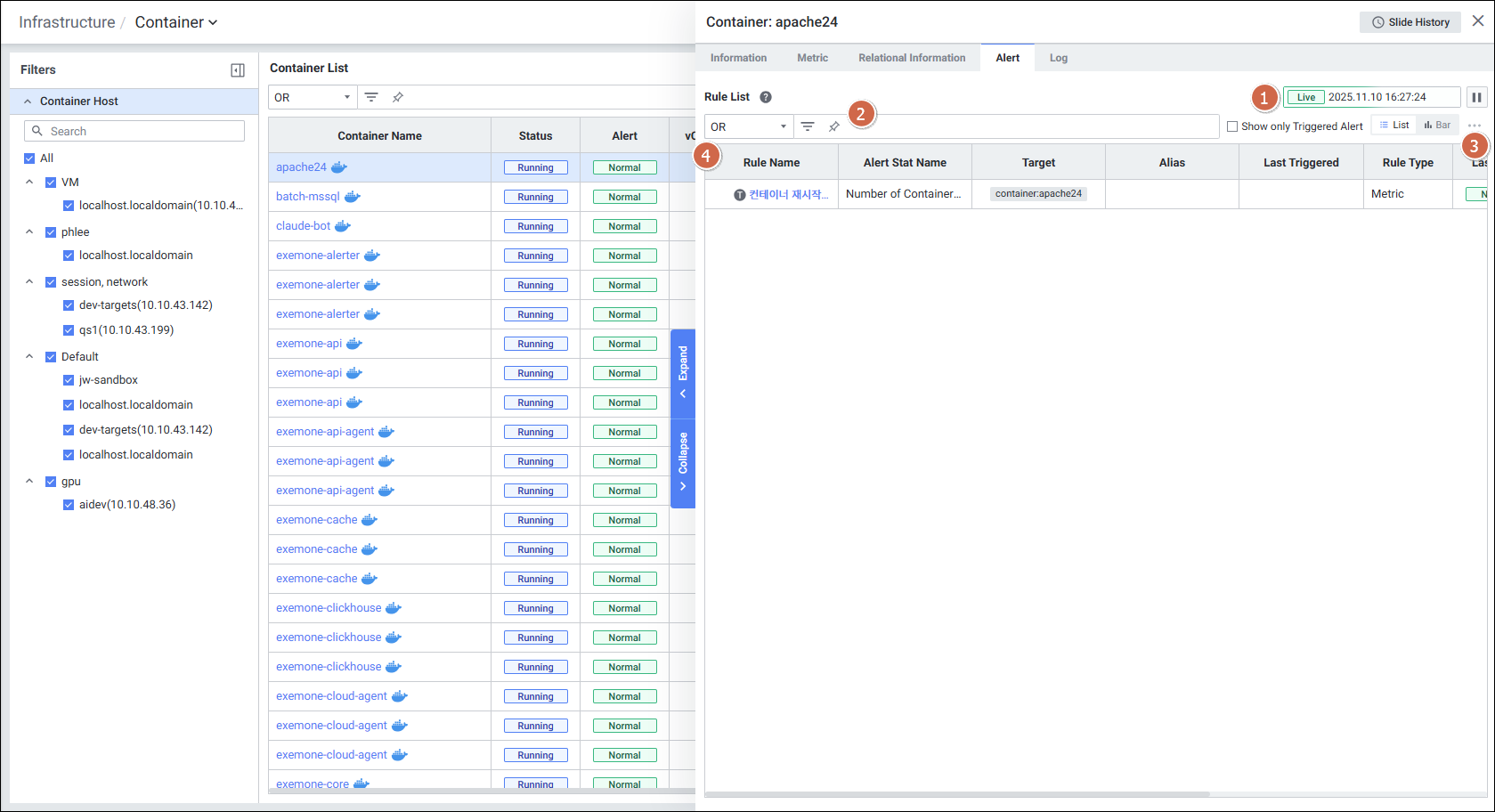
| 항목 | 설명 |
|---|---|
| Rule Name | 룰의 이름 (클릭 시 Alert Detail Slide 오픈) |
| Alert Stat Name | Alert 이름 |
| Target | Alert 발생 타겟 |
| Last Triggered | 최근 Alert 발생 시간 |
| Rule Type | 룰의 유형 |
| Last Alert | 마지막 Alert 항목 (Normal / Warning / Critical) |
2. Kubernetes Container 모니터링
참고 문서: Kubernetes Container
Kubernetes 환경의 컨테이너 전용 모니터링 화면입니다.
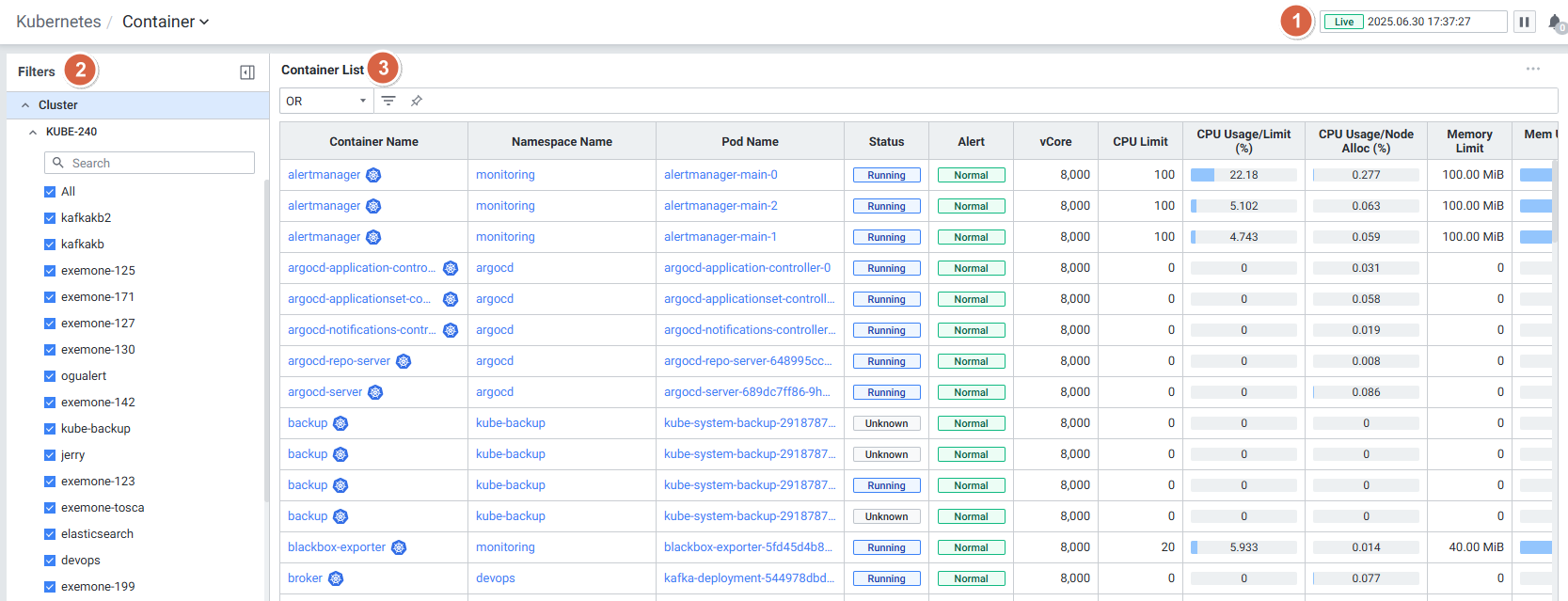
2.1 화면 구성
| 구성 요소 | 설명 |
|---|---|
| Global Time | 모니터링 재생 여부를 선택 (실시간 데이터만 조회 가능) |
| Filters | Cluster 기반 필터 항목 선택 |
| Container List | Container 목록을 Grid 형태로 표시 |
2.2 Filters (필터)
참고 문서: K8S Container Filters
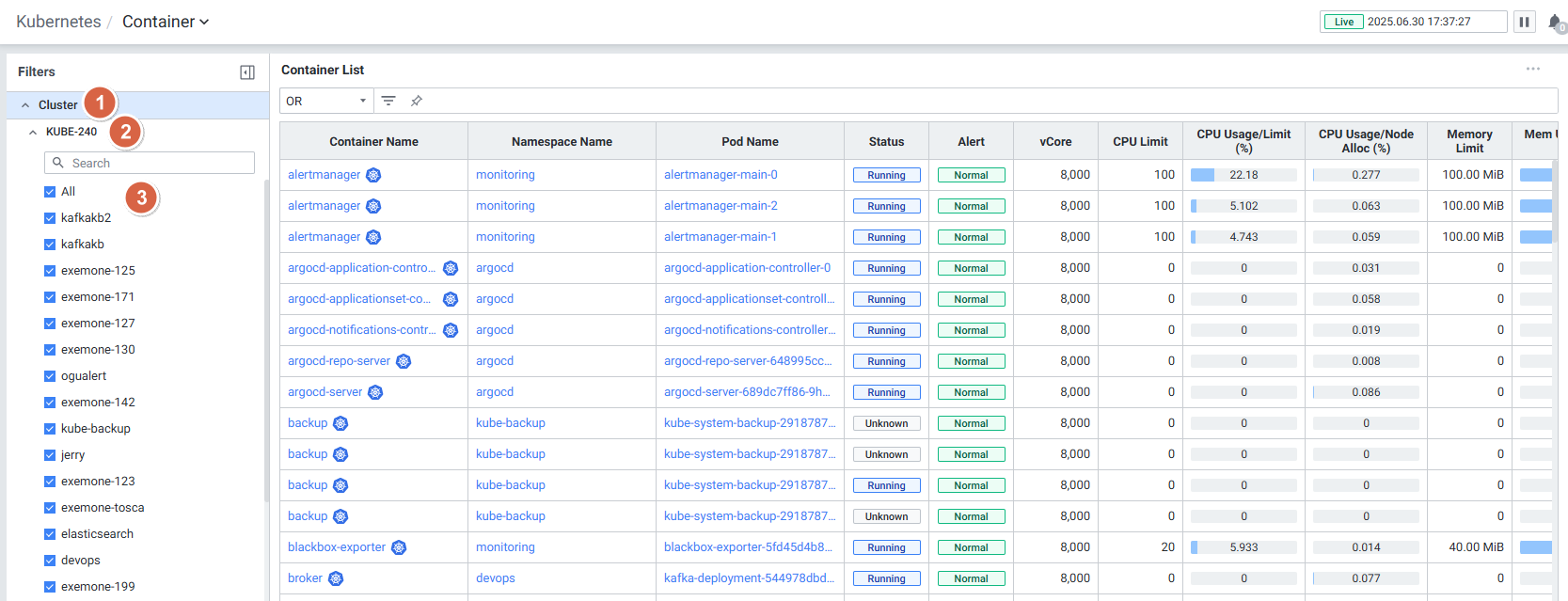
| 항목 | 설명 |
|---|---|
| Cluster | 클러스터 하위의 필터 항목 표시 (접기/펼치기 가능) |
| Search | 필터 항목 검색 (대소문자 구분 없음) |
| Filter Item | 전체 선택 상태, OR 조건으로 데이터 필터링 |
Infrastructure Container와 달리 Cluster 기반으로 필터링됩니다.
2.3 Container List (컨테이너 목록)
참고 문서: K8S Container List
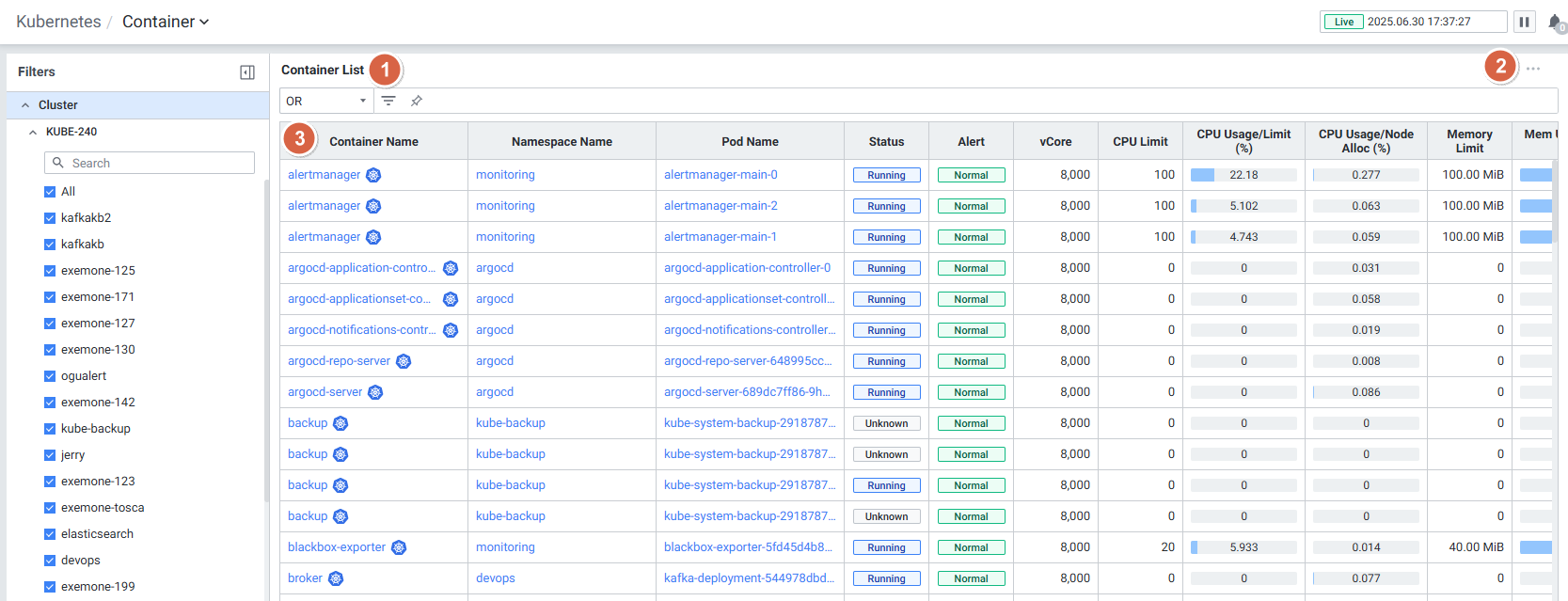
Grid 수집 항목
| 항목 | 설명 |
|---|---|
| Container Name | Container 이름 (클릭 시 Detail Slide 오픈) |
| Namespace | Container가 배포되어 있는 Namespace 이름 |
| Pod Name | 파드 이름 |
| Status | Container의 현재 Status |
| Alert | 마지막 발생된 알람 정보 |
| vCore | vCore 개수 |
| CPU Limit | Container의 CPU Limit |
| CPU Usage/Limit(%) | CPU Limit 대비 사용량 |
| CPU Usage/Node Alloc(%) | Node의 할당된 사용량 대비 CPU Usage |
| Memory Limit | Container의 Memory Limit |
| Mem Usage/Limit(%) | Memory Limit 대비 사용량 |
| Mem Usage/Node Alloc(%) | Node의 할당된 사용량 대비 Mem Usage |
| RX | Container의 네트워크 수신 |
| TX | Container의 네트워크 송신 |
| Image | Container의 Image |
| Age | Container의 Age |
2.4 Container Detail Slide (상세 슬라이드)
참고 문서: K8S Container Detail Slide
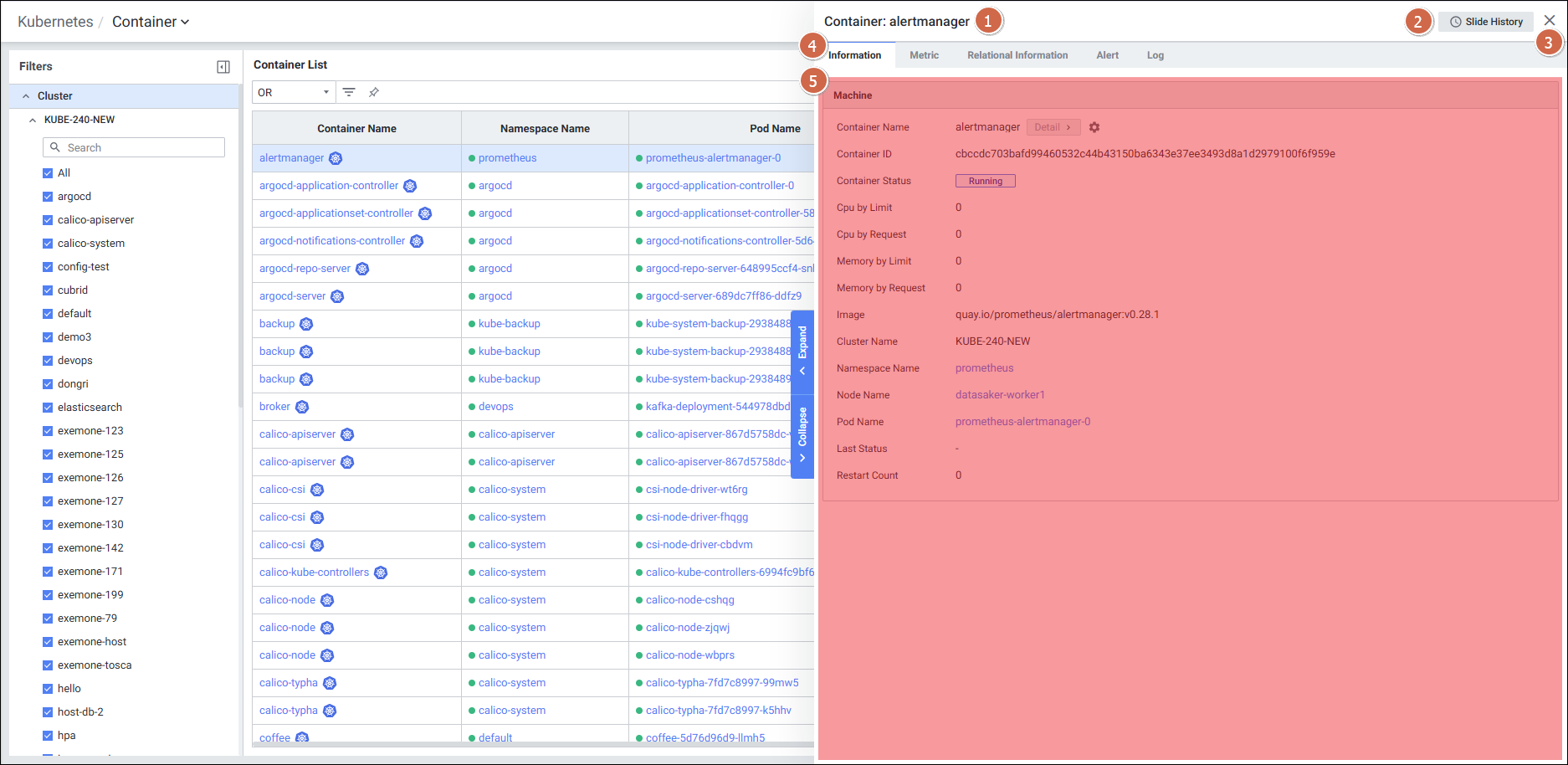
5개 탭으로 구성됩니다: Information, Metric, Relational Information, Alert, Log
2.4.1 Information(K8S) 탭
참고 문서: K8S Container Information
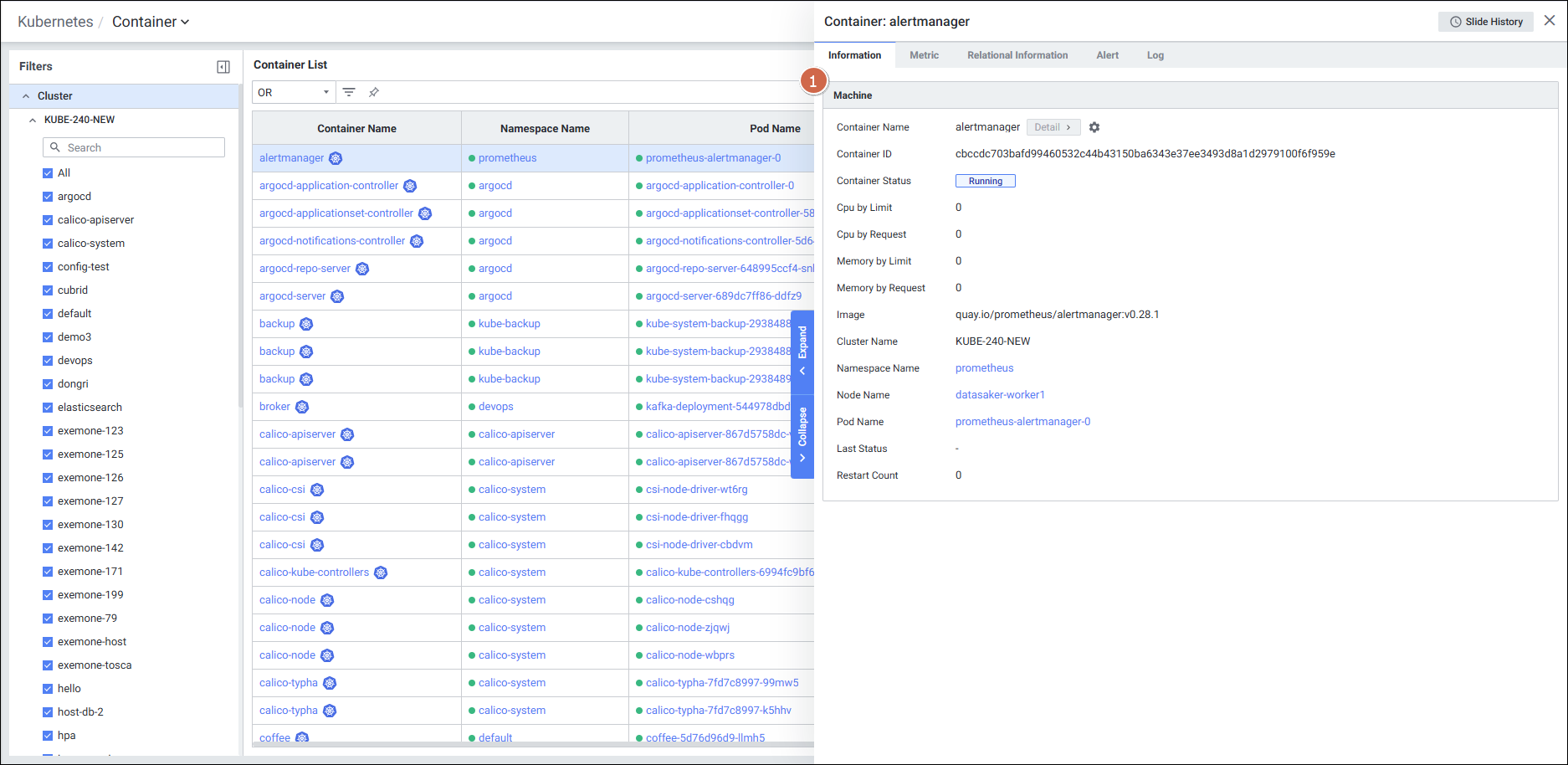
Kubernetes 환경에 맞는 14개 항목의 Machine 정보를 제공합니다:
| 항목 | 설명 |
|---|---|
| Container Name | 컨테이너 이름 |
| Container ID | 컨테이너 ID |
| Container Status | 컨테이너 상태 |
| Cpu by Limit | 컨테이너의 CPU 제한 수치 |
| Cpu by Request | 컨테이너의 CPU 최소 요구 수치 |
| Memory by Limit | 컨테이너의 메모리 제한 수치 (unlimit인 경우 host total memory) |
| Memory by Request | 메모리 최소 요구 수치 |
| Image | 컨테이너 이미지 정보 |
| Cluster Name | 클러스터 이름 |
| Namespace Name | 네임스페이스 이름 |
| Node Name | 노드 이름 |
| Pod Name | 파드 이름 |
| Last Status | 마지막 Status |
| Restart Count | 재시작 횟수 |
2.4.2 Metric 탭
참고 문서: K8S Container Metric
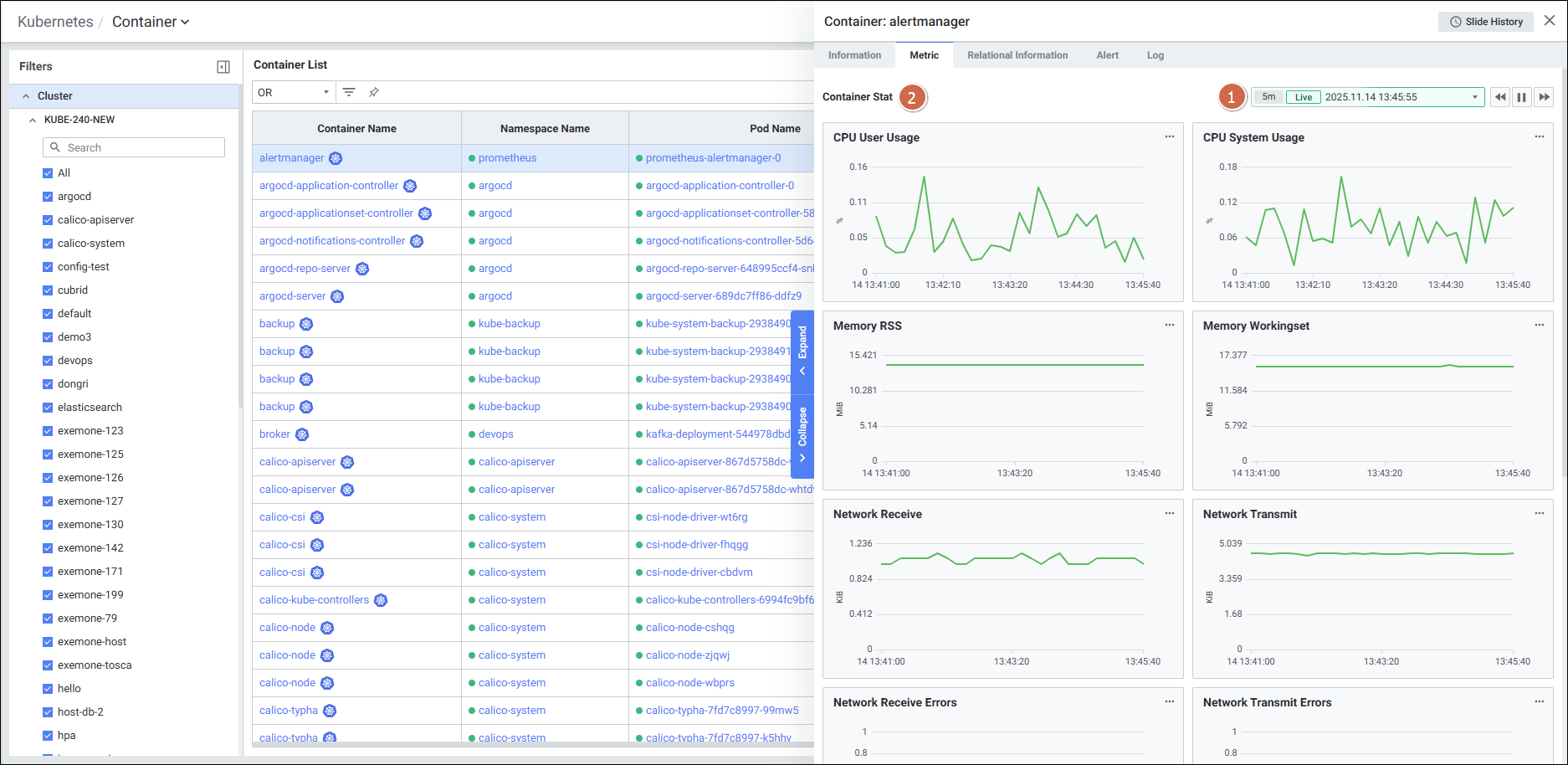
Infrastructure Container와 동일한 12개 성능 지표를 차트로 제공합니다:
| 지표 | 설명 |
|---|---|
| CPU User Usage (%) | 컨테이너의 CPU User 사용량 |
| CPU System Usage (%) | 컨테이너 CPU System 사용량 |
| Memory RSS (bytes) | 컨테이너의 RSS memory |
| Memory Workingset (bytes) | 컨테이너의 workingset (usage – inactivefile) |
| Network Receive (bytes) | 네트워크 Receive bytes |
| Network Transmit (bytes) | 네트워크 Transmit bytes |
| Network Receive Errors (count) | Receive 에러 패킷 수 |
| Network Transmit Errors (count) | Send 에러 패킷 수 |
| Filesystem Read (bytes) | Disk 읽기 bytes |
| Filesystem Write (bytes) | Disk 쓰기 bytes |
| CPU Throttling Count (count) | Throttling 횟수 |
| CPU Throttling (ms) | Throttling 상태 지속 시간 |
2.4.3 Log(K8S) 탭
참고 문서: K8S Container Log
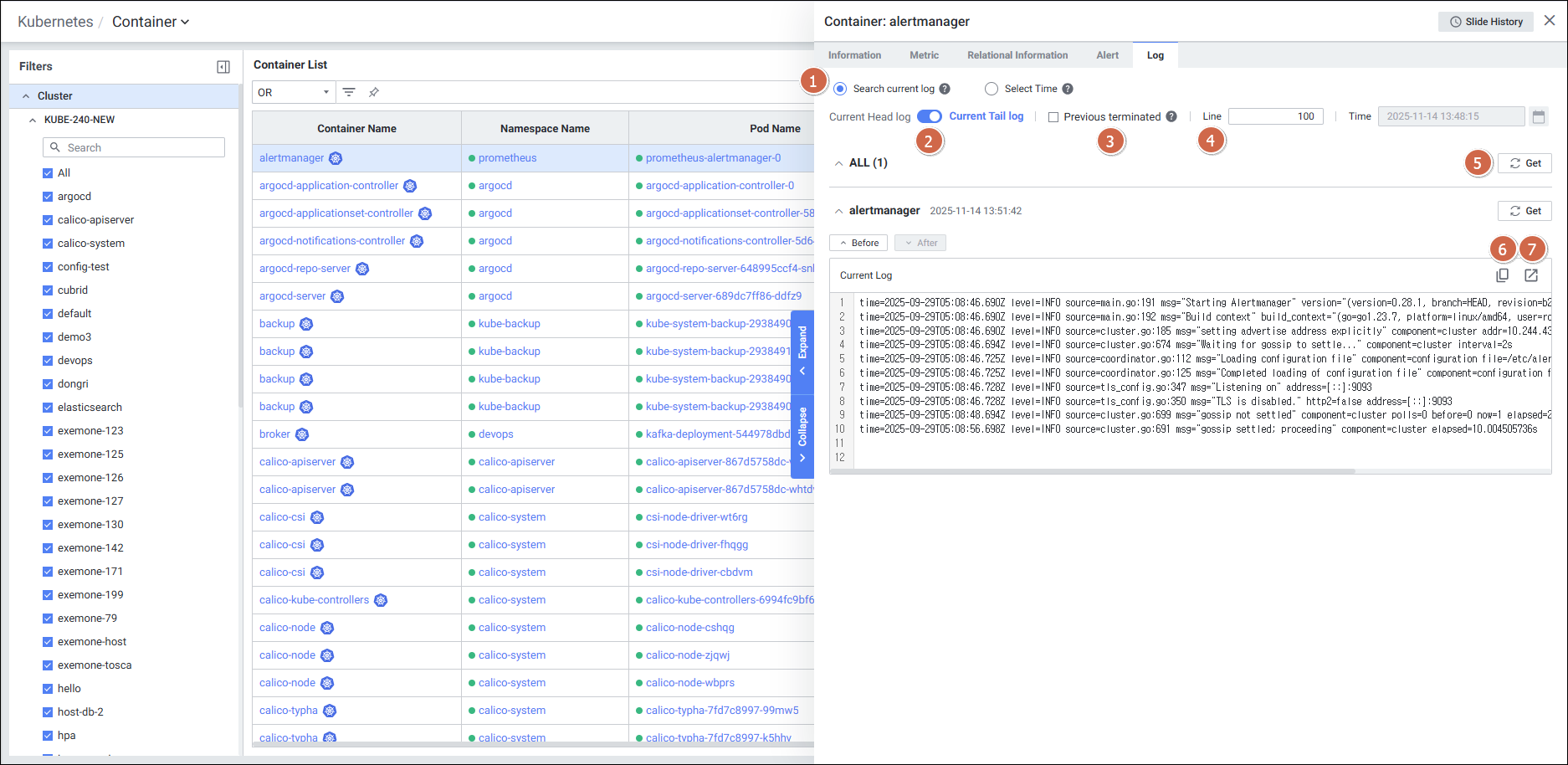
Infrastructure Container의 Log 탭보다 더 풍부한 기능을 제공합니다:
| 기능 | 설명 |
|---|---|
| Radio Button | 검색할 로그 선택: Search current log (최근 로그) / Select Time (특정 시간 로그) |
| Toggle | 최근 로그 출력 방식: Current Head Log (앞부분) / Current Tail Log (뒷부분) |
| Check box | 이전 종료된 컨테이너의 로그 출력 여부 선택 |
| Line | 로그 출력 라인 수 설정 |
| Get | 현재 로그 목록 데이터 조회 |
| Copy | 텍스트 복사 |
| Expansion | 새로운 Current Log 창 생성 |
2.4.4 Relational Information 탭
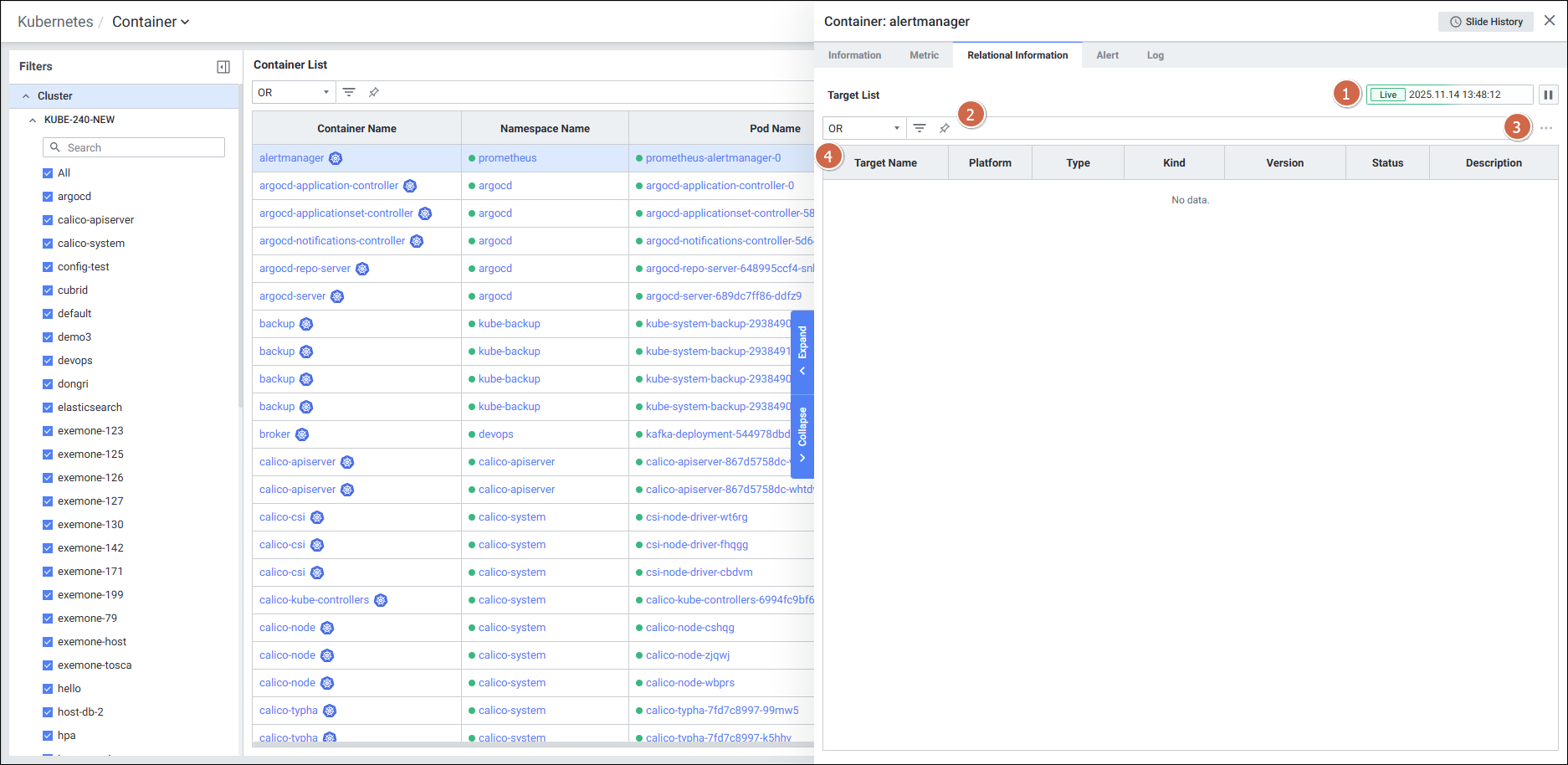
연관된 타겟 목록을 Grid 형태로 제공합니다 (Target Name, Platform, Type, Kind, Version, Status, Description).
2.4.5 Alert 탭
참고 문서: K8S Container Alert
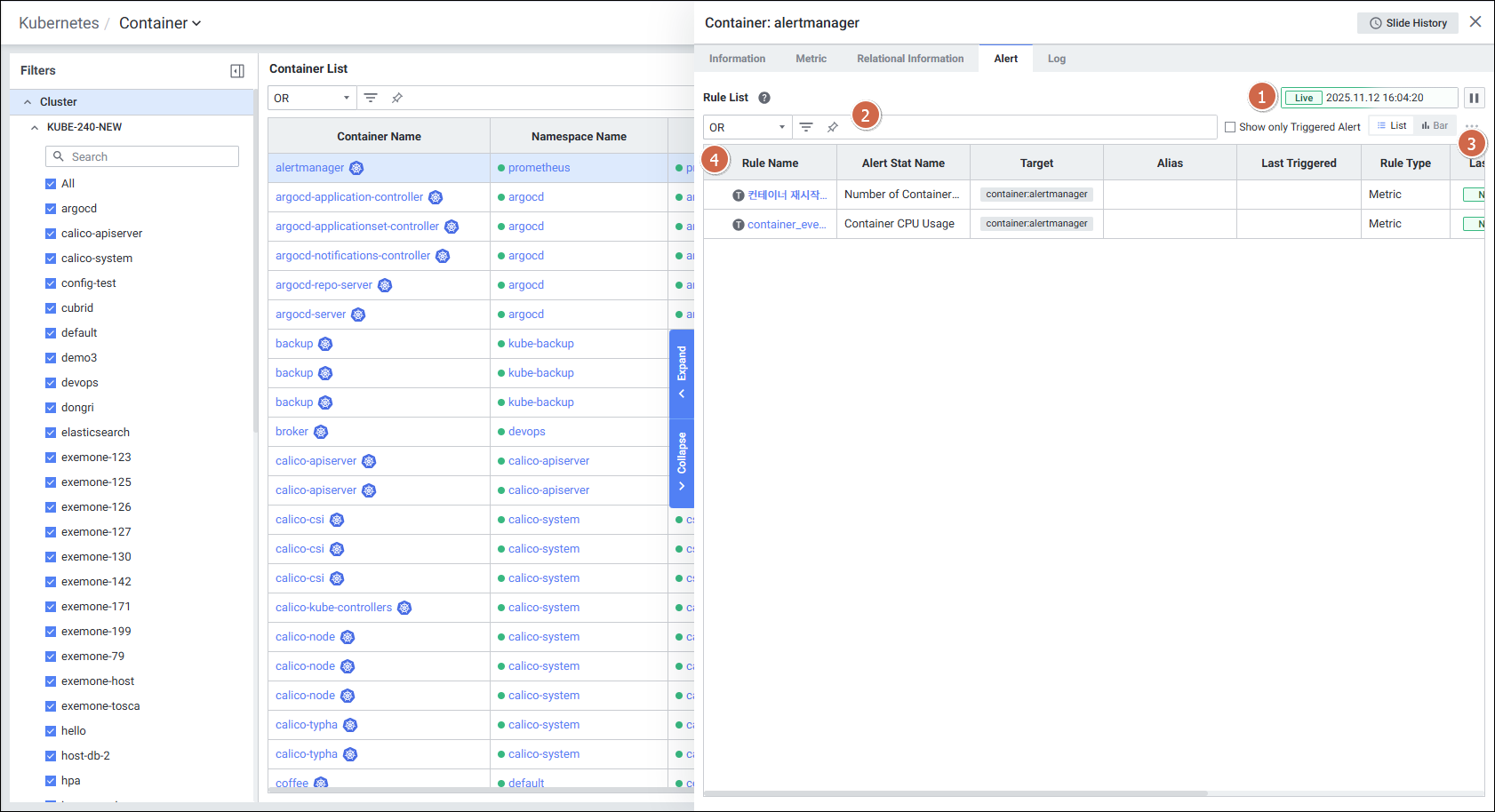
| 항목 | 설명 |
|---|---|
| Rule Name | 룰의 이름 (클릭 시 Alert Detail Slide 오픈) |
| Alert Name | Alert 이름 |
| Target | Alert 발생 타겟 |
| Last Triggered | 최근 Alert 발생 시간 |
| Rule Type | 룰의 유형 |
| Last Alert | 마지막 Alert 항목 (Normal / Warning / Critical) |
| Threshold | 알람 발생 조건 |
| Value | 현재 지표의 값 |
3. Infrastructure vs Kubernetes Container 비교
| 구분 | Infrastructure Container | Kubernetes Container |
|---|---|---|
| 필터 기준 | Container Host | Cluster |
| 목록 항목 | CPU(%), CPU Usage/Limit, CPU Usage/Total, Memory Usage/Limit, Memory Usage/Total, Host | CPU Usage/Limit(%), CPU Usage/Node Alloc(%), Mem Usage/Limit(%), Mem Usage/Node Alloc(%), Namespace, Pod Name |
| Information | 7개 항목 (Container Name, Stat, Container Type, Container ID, Image, Age, Host Name) | 14개 항목 (Cluster, Namespace, Node, Pod, CPU/Memory Limit/Request, Restart Count 등 K8S 전용 정보 포함) |
| Metric | 12개 지표 (동일) | 12개 지표 (동일) |
| Log | 단순 Get/Copy 기능 | Head/Tail 선택, 시간 지정 검색, 이전 컨테이너 로그, 라인 수 설정, 확장 창 기능 |
| Alert | 6개 항목 | 8개 항목 (Threshold, Value 추가) |
4. Container OS 리소스 사용률(Usage) 지표
참고 문서: Container OS 리소스 사용률 지표 가이드
exemONE K8S Agent에서 각 컨테이너의 limit 값 대비 실제 메모리 및 CPU 사용률을 산출하는 지표입니다.
4.1 Container Memory Usage by Limit
- 컨테이너별 limit 값 대비 메모리 사용률을 나타냅니다.
- limit 값은 container-agent의
USE_NODE_RESOURCE_FOR_UNLIMIT옵션 설정에 따라 데이터가 수집됩니다.
4.2 Container CPU Usage by Limit
- 컨테이너별 limit 값 대비 CPU 사용률을 나타냅니다.
- limit 값은 container-agent의
USE_NODE_RESOURCE_FOR_UNLIMIT옵션 설정에 따라 데이터가 수집됩니다.
주의사항
USE_NODE_RESOURCE_FOR_UNLIMIT 옵션의 설정에 따라 limit 데이터 수집 및 사용률 산출 방식이 달라질 수 있으므로, 옵션 설정 현황을 반드시 확인해야 합니다.
5. 수집 항목 종합 정리
| 카테고리 | 수집 지표 |
|---|---|
| CPU | CPU User Usage (%), CPU System Usage (%), CPU Throttling Count, CPU Throttling (ms), CPU Usage/Limit(%), CPU Usage/Total(%), CPU Usage/Node Alloc(%) |
| Memory | Memory RSS (bytes), Memory Workingset (bytes), Memory Usage/Limit(%), Memory Usage/Total(%), Memory Usage/Node Alloc(%) |
| Network | Network Receive (bytes), Network Transmit (bytes), Network Receive Errors (count), Network Transmit Errors (count), RX, TX |
| Filesystem | Filesystem Read (bytes), Filesystem Write (bytes) |
| 상태 정보 | Status, Alert Level, vCore, CPU Limit, Memory Limit, Image, Age, Host, Restart Count (K8S) |
| K8S 전용 | Namespace, Pod Name, Cluster Name, Node Name, Cpu by Request, Memory by Request, Last Status |